OpenCode Server Health & Restart
Monitor the managed OpenCode server's status and control restarts and upgrades from the Settings UI.
Overview
OpenCode Manager runs a supervised OpenCode server process to handle agent sessions. The OpenCode Config tab in Settings shows the server's current status, version information, and provides controls for restarting or upgrading the server without bringing down the Manager itself.
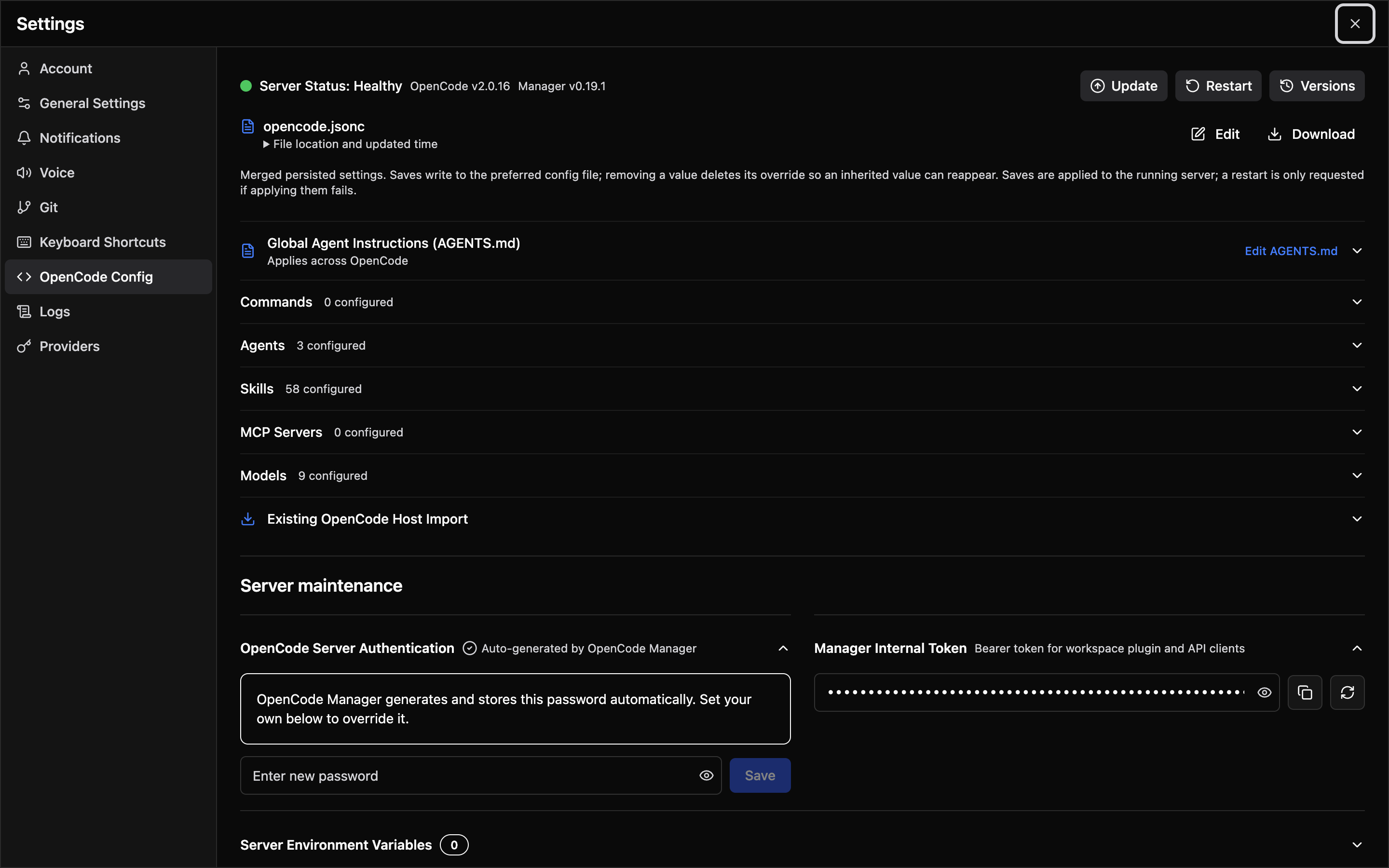
Server Status
| Indicator | Meaning |
|---|---|
| Healthy | The OpenCode server is running and responding to health checks |
| Unhealthy | The server is not responding. The Manager will attempt automatic recovery. |
The panel shows a single Server Status value, Healthy or Unhealthy. A server that is still starting after a restart or Manager startup is reported as Unhealthy until its first successful health check.
The panel also displays:
- OpenCode version — The installed version of the OpenCode server (e.g.,
v2.0.15). OpenCode Manager requires OpenCode 2.x at 2.0.15 or newer; a 1.x or older 2.x binary fails to start. - Manager version — The current OpenCode Manager version (e.g.,
v0.14.5)
Health Monitoring
The Manager periodically polls the OpenCode server's health endpoint (GET /api/info, authenticated with the managed password). A 401 or a non-JSON response counts as unhealthy. If the server becomes unresponsive:
- The Manager logs the failure and increments a failure counter
- After a configurable number of consecutive failures (default: 2), automatic recovery begins
- Recovery restarts the OpenCode server process
- OpenCode 2 resumes interrupted executions natively on boot, so the Manager makes no abort or
continuecalls itself
Configuration
Health monitoring is configured through environment variables:
| Variable | Default | Description |
|---|---|---|
OPENCODE_HEALTH_WATCH_ENABLED | true | Enable health watcher and recovery (false in tests) |
OPENCODE_HEALTH_POLL_MS | 30000 | Poll interval in milliseconds |
OPENCODE_HEALTH_FAILURE_THRESHOLD | 2 | Failed checks before recovery starts |
Configuration Recovery
The on-disk global configuration files in .config/opencode/ are the source of truth. OpenCode 2 reads the two recognized sources in order — opencode.json, then opencode.jsonc — with later files overriding matching keys from earlier ones. The Manager reads and edits the same set: saves patch only the changed paths into the preferred existing source (opencode.jsonc > opencode.json), preserving comments and untouched keys, and a fresh installation is seeded with opencode.jsonc. The schema accepts both V1-compatible keys and native OpenCode 2 fields, so a V2-native config is not flagged invalid. MCP servers are always written in the native OpenCode 2 shape under mcp.servers.<name> — type (local with command, optional cwd and environment; or remote with url, optional headers and oauth using client_id, client_secret, scope, and redirect_uri), plus optional disabled and timeout (startup, catalog, execution in milliseconds). Legacy flat mcp.<name> entries are never written; OpenCode 2 still normalizes them on load, so they appear in Settings → MCP from the running server's status but must be moved under mcp.servers to be edited or removed from the Manager. A legacy config.json, which OpenCode 2 ignores, is folded into the lowest-precedence source it does not override and archived on startup. When a source exists at boot but fails validation, the Manager logs a warning and starts with the files unchanged — an invalid config is never automatically replaced or rolled back during boot.
The health-watch ladder is the only automatic repair path. When the supervised OpenCode server fails repeated health checks, recovery runs these actions in order until the server is healthy:
- Restart — restart the server process
- Debug capture — capture a diagnostic snapshot, then restart
- Rollback to last known good — archive the broken config and restore the last known good config
- Seed default config — write the minimal seed config and restart
Because the ladder only runs after repeated failed health checks, a config file that fails validation but does not make the server unhealthy is left in place. Setting OPENCODE_HEALTH_WATCH_ENABLED=false disables the ladder entirely, leaving no automatic repair path.
Failure Reporting
When startup fails without a recovery path, or every recovery action has been tried, the server enters the failed state:
- A persistent error toast shows the failure reason, with View logs (opens Settings → Logs) and Restart actions. It appears once per distinct failure, including when the app is opened while the server is already failed, and is replaced by a "back online" notice once the server is healthy again. Transient unhealthy or recovering states do not toast.
- The Settings → Logs tab shows the failure reason and the recovery actions already attempted above the log stream.
- A server process that exits or cannot be launched (for example, a missing executable) fails startup immediately with its exit code and the tail of its stderr, rather than waiting for the 30-second health timeout.
The last known good config is a snapshot of every recognized source file (including which ones exist), captured before every write made through the Settings UI, the internal API, or a host config import, so any of those can be undone with POST /api/settings/opencode-rollback or by the ladder. Restoring a snapshot rewrites the sources it contains and removes recognized sources it does not. Archived broken configs and debug snapshots are kept under .opencode/state/health-watch/ in the workspace, pruned to the newest 20 files.
Earlier releases stored named configuration profiles in the Manager database. On first start after upgrading, each profile is archived to .config/opencode-configs-archive/<name>.json in the workspace, the default profile is restored to opencode.json if that file does not exist yet, and the database table is dropped.
Restart with Session Resume
When you restart the OpenCode server (manually or through an upgrade), active sessions are handled gracefully:
- Restart — The OpenCode server process is stopped with a grace period so in-flight turns are suspended, then started fresh
- Resume — OpenCode 2 resumes interrupted executions natively on boot and continues each turn in its transcript; the Manager makes no abort or
continuecalls itself and does not report individual sessions
Confirmation
If there are active sessions when you click Restart, a confirmation dialog shows how many sessions will be interrupted. You can proceed or cancel.
Upgrading OpenCode
Click Update to check for and install the newest supported OpenCode 2 version. The process:
- Checks the currently installed version against the newest stable release of the
@opencode/clipackage on npm that is inside the supported range (at or above the pinned version, same major version); newer major versions are never selected - Downloads the matching binary from
https://opencode.ai/files/bin/<version>/and verifies it before installing to~/.opencode/bin/opencode - Restarts the server using the same session-resume flow described above
- The new version is displayed in the status panel after restart
Installing a specific version from Settings → OpenCode Config works the same way; versions outside the supported range are rejected before any download. A failure before the installed binary is replaced (registry lookup, download, or extraction) returns an error without restarting the server. If the failure happens after the binary is replaced and the server recovers to a usable state, a recovery notice is shown with the fallback version.
When OPENCODE_BIN is set, the OpenCode binary is managed outside the Manager: Update and version installs are refused with 409 and nothing is downloaded or restarted.
Manual Restart Triggers
Besides the explicit Restart button, the server is automatically restarted when:
- Config import completes — Importing a standalone OpenCode config into the workspace
- Version upgrade — After installing a new OpenCode version
Saving the OpenCode configuration never restarts the server. A change to the merged configuration is written to disk and applied immediately with an OpenCode location reload, which re-reads the configuration, agents, commands, skills, plugins, and AGENTS.md for every loaded location without interrupting running sessions. Comment-only edits do nothing, and changes limited to the mcp section are applied by the Settings UI through the MCP API. The change is flagged as restart required only when the reload fails, for example because the server is unavailable. Changes to how the server process is launched still need a restart: server environment variables, Git credentials, sandbox enforcement, manager token rotation, the server password, and OpenCode version installs. The default git identity applies without a restart: it is written to Manager's own git config file, which the running OpenCode process and its agent shells already read. Saving a provider credential, or completing a provider OAuth flow, applies to the running server immediately without a restart, because OpenCode 2 stores credentials in its database and broadcasts the change.
A save is rejected with 409 when the files changed since you loaded them (stale revision), or when it would remove a value that is defined only in a lower-priority source file — removing it from the preferred file would leave the inherited value in effect.